Client works
hsbc
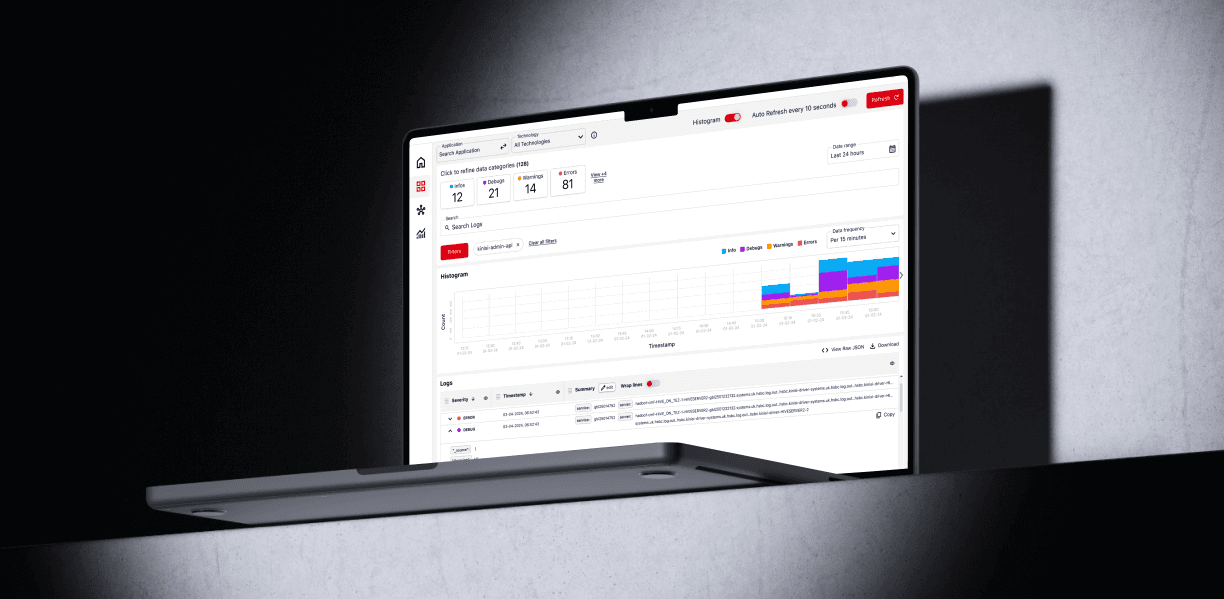
Client.
As the lead Product Designer for HSBC’s Kinisi data ingestion tool I aimed to simplify the complex and manual workflows users faced when managing large data streams. Traditional tools were powerful but clunky and unintuitive slowing teams down and frustrating users. Kinisi was designed to fix that.
Discovery.
Through user interviews, workshops, and competitor analysis, I gathered deep insights into the challenges users faced with data ingestion tools. These revealed key pain points that hindered their workflow, including complex and time-consuming feed creation, manual error-prone mapping, and inadequate monitoring.
Competitor Feature Comparison:
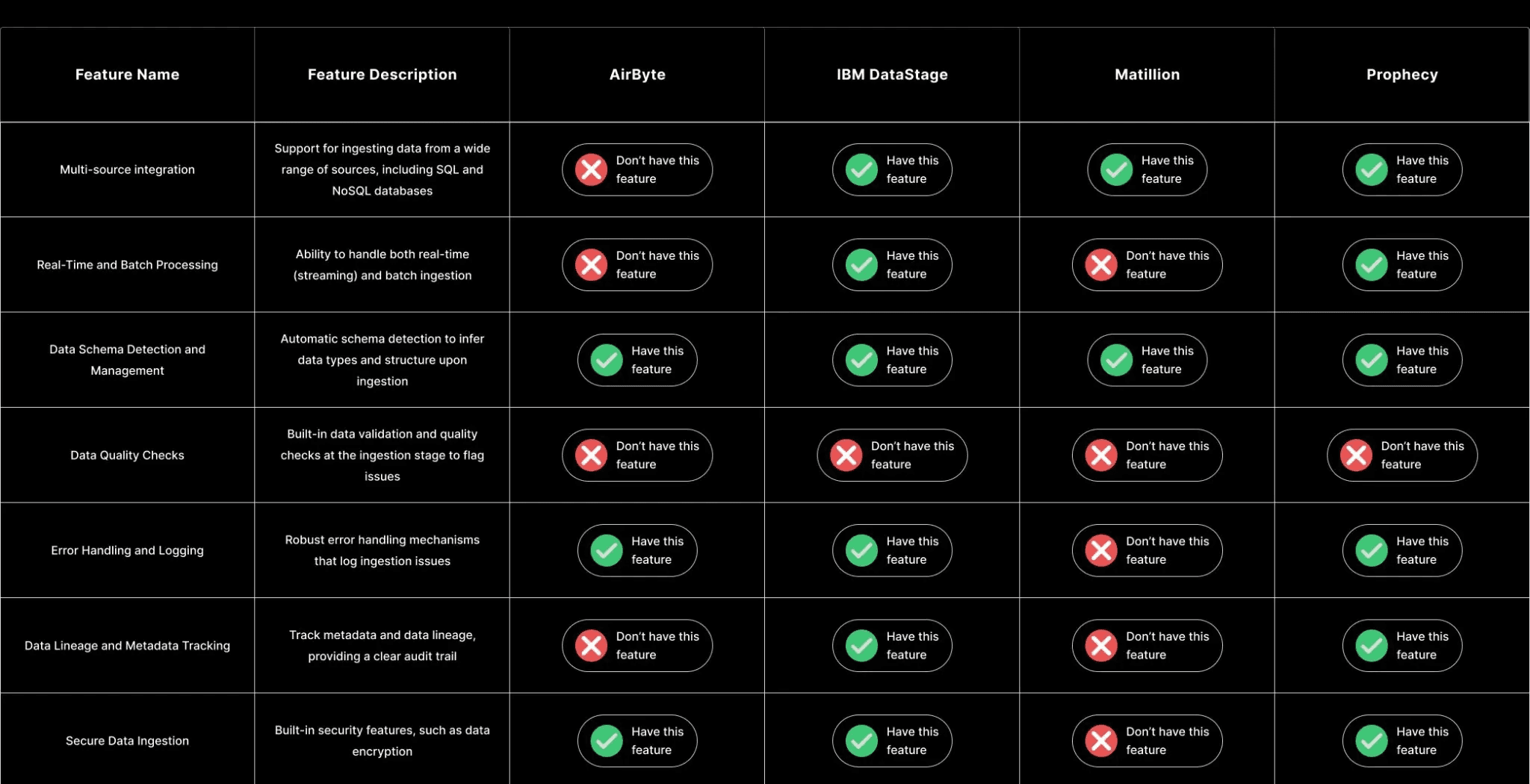
I mapped out all user insights gathered during discovery and narrowed them to clearly define the exact issues users faced with Kinisi’s data ingestion tool. A key feature of the tool is the ability to create custom data feeds and map them efficiently, ensuring seamless data flow from source to destination. Research showed users struggled with complex, manual workflows requiring multiple steps to map, configure, and ingest data.
The three main pain points identified were:
Complex Data Feed Creation
Users found defining data sources and destinations confusing and time-consuming, with unclear workflows that made setting up feeds difficult and inefficient.
Manual and Error-Prone Field Mapping
The mapping process required extensive manual input, leading to frequent errors and frustration among users.
Poor Monitoring and Lack of Clear Error Handling
Users struggled to track data ingestion progress and troubleshoot issues due to insufficient real-time monitoring and vague error messages, causing downtime and delays.
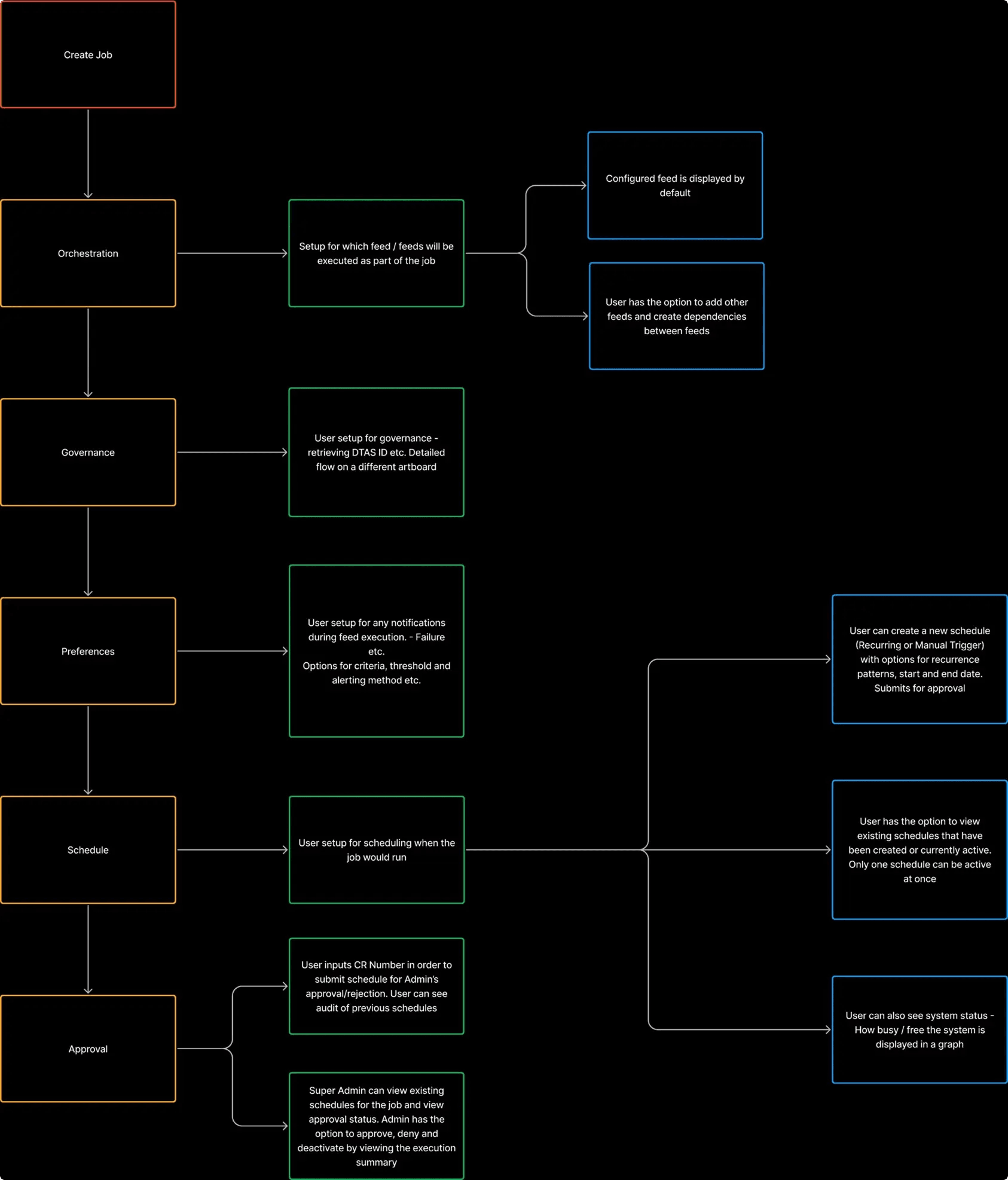
Mapping out the users current workflow:
Defining.
Focusing on the core problems, I worked closely with all stakeholders to define the key issues we were facing, such as the complexity of data feed creation, the difficulty of manual field mapping, and the lack of efficient monitoring and error handling. Through collaborative discussions, we identified these critical challenges in the data ingestion process. We then narrowed the scope to address these issues directly, ensuring that our solution would have the greatest impact. By focusing on the most pressing pain points, we were able to prioritize features that would deliver immediate value to users. This approach helped streamline the design process and ensured that our efforts were aligned with the goals of both the users and the business.
Problem.
Problem Statement:
“Users are facing complex and time-consuming data ingestion processes, from creating data feeds to manually mapping fields between sources and destinations. These challenges are causing inefficiencies and errors, preventing teams from using data effectively and slowing down their workflows.”
Solution.
Solution Statement:
“To address the challenges of complex and time-consuming data ingestion processes, my team and I are developing a streamlined solution that simplifies feed creation, automates field mapping, and improves monitoring and error handling. As the lead designer, my role is to define the user experience, simplify workflows, and ensure the solution is intuitive and efficient—ultimately empowering teams to work more effectively and reduce errors.”
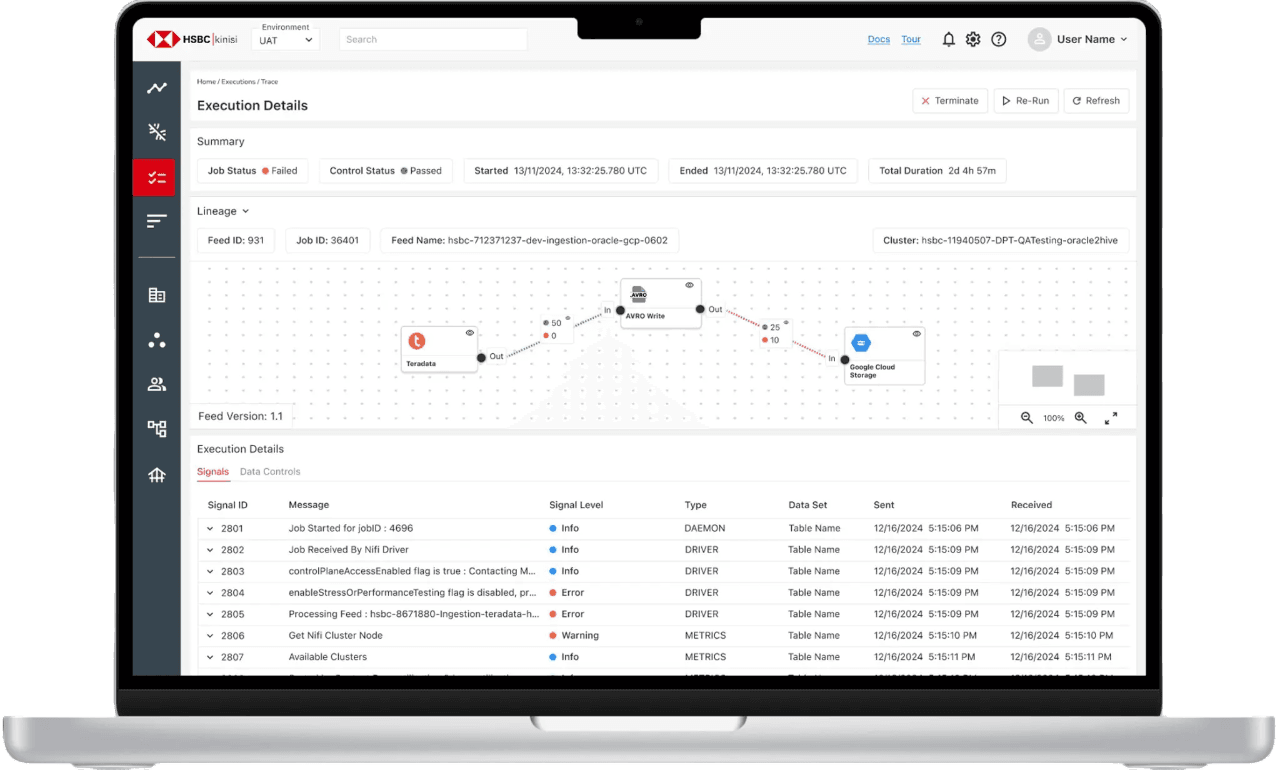
During research, I discovered users struggled to track and monitor execution details, making it hard to identify issues during data transfer. This critical pain point risked derailing the user experience. I prioritised it because addressing it promised the greatest and most immediate improvement in workflow efficiency.
To address the most pressing pain points, I led the team in prioritising and defining the solution:
- I presented user research findings to stakeholders to build consensus on focusing on feed creation, mapping, and monitoring improvements.
- I designed a streamlined, intuitive five-step workflow for data feed creation to reduce complexity and setup time.
- I implemented rapid prototyping to accelerate feedback cycles, iterating quickly with low-fidelity mockups and stakeholder input.
- I drove collaboration across design, product, and engineering to ensure alignment and deliver an efficient, user-centered solution.
This decision had a noticeable impact on the user experience. After implementing the new user experience in a canvas interface, users found the execution much easier to navigate, and identification times were drastically reduced through user testing. The rapid prototyping approach helped us fine-tune the process quickly, ensuring that we met user needs efficiently. This experience highlighted the importance of making data-driven decisions and being decisive when faced with competing priorities.
Rapid Prototyping – Early Dashboard Concept
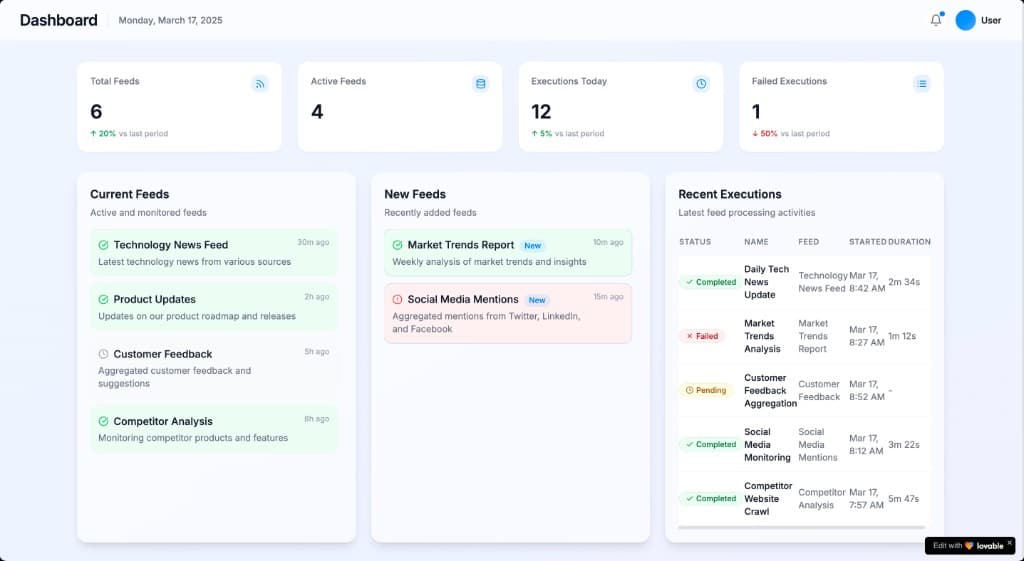
Above is an example of a prototype that was used to quickly explore display data and navigation ideas with stakeholders. It allowed for fast iteration and validation of the overall structure before moving into final execution, ensuring the design aligned with user needs.
Results.
Usability Testing
Usability testing was conducted iteratively through moderated and unmoderated sessions across prototype fidelity levels. This approach enabled us to validate design decisions, identify friction points, and continuously improve user experience, resulting in measurable increases in task success and satisfaction.
Three main findings:
1. Navigation Issues:
Problem: Users felt lost between setup steps and unsure of their progress.
How I Found It: Identified through usability testing, where users consistently expressed confusion about where they were in the process.
Solution: Simplified the navigation flow and added visual cues to improve clarity and help users track their progress, aligning with both user ease and business efficiency.
2. Confusing Terminology:
Problem: Technical terms in the setup process confused users, leading to errors.
How I Found It: Discovered during testing when users asked for clarification or made mistakes due to unclear language.
Solution: Simplified the terminology and added tooltips to provide context, making the process more intuitive and reducing user errors, meeting both user and business goals.
3. Vague Error Messages:
Problem: Error messages were too generic, leaving users unsure about how to resolve issues.
How I Found It: Users reported difficulty troubleshooting issues during usability testing.
Solution: Refined the error-handling system to provide more detailed, actionable messages, helping users resolve problems faster while maintaining efficient workflows for the business.
Challenges & Constraints
Throughout the design process, the team and I faced several challenges, including complex data mapping, a tight development timeline, and misaligned stakeholder expectations, each of which required quick adaptation and prioritisation to maintain progress.
1. Complex Data Mapping:
When I learned it: During the wireframing phase, I realised that users were struggling with the complexity of defining data sources and destinations.
Challenge faced: Users found the manual field mapping process overwhelming and error-prone, making it difficult to efficiently set up data feeds.
2. Tight Development Timeline:
When I learned it: As development progressed, I realised that the project timeline was shorter than expected, putting pressure on the team to complete the design quickly.
Challenge faced: The tight timeline forced us to prioritise certain features over others, which reduced the time available for testing and iteration.
3. Misalignment of Stakeholder Expectations:
When I learned it: Midway through development, after gathering feedback from stakeholders, I noticed that their business goals conflicted with user-centered design priorities.
Challenge faced: Conflicting expectations led to frequent revisions and delays, which impacted the overall alignment between business goals and user experience.
Key Learnings
Leading the Kinisi project involved navigating several challenges and constraints, from which I learned valuable lessons that shaped my approach and improved the overall outcome.
1. Complex Data Mapping:
What I learned: Simplifying complex data mapping early on is crucial to creating an intuitive user experience. I realised that by breaking down the process into manageable steps, we could reduce confusion and increase user efficiency.
What I would do next time: I would implement a more streamlined approach, focusing on automating some of the data mapping to reduce manual work. I would also introduce early user testing to ensure the mapping process is as simple and clear as possible.
2. Tight Development Timeline:
What I learned: When faced with a tight deadline, prioritising core features and focusing on the most critical user needs ensures that the project remains on track. I learned that we needed to balance speed with quality to meet deadlines without sacrificing the overall user experience.
What I would do next time: I would start with a clearer roadmap that includes buffer time for testing and refinement. In future projects, I’d also focus on iterative, smaller releases that allow for more flexibility in testing and adjustments.
3. Misalignment of Stakeholder Expectations:
What I learned: Early and frequent communication with stakeholders is key to ensuring alignment between business goals and user needs. I found that regular updates and design reviews helped mitigate potential conflicts and kept the project on track.
What I would do next time: I would involve stakeholders earlier in the design process, particularly during the wireframing and prototyping stages. By gaining alignment at these early stages, I could minimise revisions and improve efficiency.
Outcomes & Successes
The outcomes of the Kinisi product reflect significant improvements in user experience and operational efficiency, directly supporting HSBC’s broader business goal of enabling faster, more reliable data-driven decisions. Key successes included streamlining the data feed creation process, reducing data ingestion errors, and accelerating internal release cycles through faster iteration and feedback loops.
1. Improved Data Feed Creation Process:
Outcome: Reduced data feed creation time by 40%, tracked through task completion times logged during usability testing sessions.
How It Was Achieved: Simplified the data feed creation process into an intuitive five-step workflow, adding visual cues and tooltips to guide users through each step.
Success: This change resulted in faster setup times, greater user satisfaction, and a significant reduction in setup-related errors, improving overall adoption of the product.
2. Enhanced Data Accuracy:
Outcome: Decreased data ingestion errors by 30%, tracked through error rate monitoring and product analytics.
How It Was Achieved: Added validation checks to alert users about mismatches or incomplete data.
Success: This resulted in fewer data errors, smoother ingestion processes, and a more accurate system for users.
3. Successful Internal Release and Faster Iterations:
Outcome: Increased internal team feedback incorporation by 50%, measured by the number of actionable feedback points addressed in each sprint.
How It Was Achieved: Used rapid prototyping to test features internally and implemented changes in real-time.
Success: This led to reduced misalignments between teams, and faster resolution of development challenges.
Want to learn more?
benblackwood25@gmail.com